
Volume Booster Bass Booster EQ
Best Translate LLCMedical
4.6332.00 Reviews
- Version
- 1.3.0
- Installs
- 100.00K
- Age Rating
- Everyone
Screenshots
Our Review of Volume Booster Bass Booster EQ
 Analysis by Appyee
At home, audio apps often end up being used by more than one person. Someone wants a podcast louder in the kitchen, someone else reaches for headphones to listen to music, and a shared phone may pass between family members. I find a volume-and-equalizer tool most useful when it gives each listener a way to adjust sound for the moment, rather than pretending one setting will suit every person, room, and pair of headphones.
A shared phone needs a little listening etiquette
Volume Booster Bass Booster EQ is aimed at changing how audio comes through a device, so its appeal is easy to picture in an everyday household: a person listening to a spoken program while cooking may want clearer, stronger sound, while someone settling down with music may prefer a fuller bass tone through headphones. The practical benefit is flexibility, but the sensible boundary is to remember that louder is not automatically better. I would start with a modest adjustment and check the sound at the actual listening distance, especially if other people are nearby.
That shared-use angle also makes this kind of app different from simply turning up the phone’s built-in media volume. A system control is quick and familiar; an equalizer gives more room to shape the sound. The trade-off is that extra adjustment can make it easier to push playback past a comfortable level. If I were handing a phone to another person, I would leave the volume at a reasonable point and avoid assuming that the last listener’s bass or loudness preference is right for the next one.
Set expectations before changing sound
The app’s name signals its focus: louder playback, bass adjustment, and equalizer controls. Those tools can help when a recording seems quiet or thin, but they cannot repair every source. A muffled podcast, a poorly recorded voice, a weak connection, or a speaker covered by a case may still sound unsatisfying after adjustment. Before changing several controls, I would check the source itself, make sure the speaker is unobstructed, and compare the same passage at the same device volume.
That simple comparison is useful because sound changes can be easy to misjudge. A bass-heavy setting may make one song feel more energetic but can also blur speech or crowd the mids in another. For spoken audio, I would prioritize intelligibility and keep bass restrained; for music, I would make one change at a time and listen to a familiar track. This is more dependable than moving every control at once and then forgetting which adjustment helped.
There is also a practical distinction between listening on the phone’s speaker and using headphones. A setting that seems pleasant from a small speaker may become tiring through headphones, where sound is close to the ears. I would treat each listening setup separately and recheck the level after switching devices. If a shared phone changes hands, that quick check matters more than keeping a saved sound profile untouched.
Who is likely to get the most from it
I can see this being useful for someone who regularly adjusts music and spoken audio and wants more direct control than the standard volume buttons provide. It may suit listeners who experiment with bass, people who switch between different kinds of content, and anyone who wants to see whether equalizer changes make a familiar recording easier to enjoy. The app is free to install, and it is categorized as a medical app, though its described purpose is audio adjustment rather than diagnosis or treatment.
It is less suitable for someone who only wants a simple, reliable volume control and never changes audio settings. The built-in controls may be enough for that person, with fewer things to manage. I would also skip relying on a booster as a fix for a failing speaker or as a reason to listen at uncomfortable levels. If clarity is the problem, checking the recording, headphones, speaker placement, and device condition may be more useful than increasing loudness.
For a household, I would treat the app as a personal listening adjustment, not a shared preset everyone should keep. One listener’s preferred bass can make another person’s podcast harder to follow, and a high setting left behind can surprise the next user. A quick reset to a comfortable level before passing the device along is a small habit that avoids most of that friction without needing any special family or account feature.
First Impressions and Setup
The first thing I noticed about Volume Booster Bass Booster EQ was its straightforward interface. You know how some apps bombard you with complex options right from the start? Not this one. It’s super intuitive, and within a few taps, you’re ready to dive into your music or podcasts with enhanced audio. Plus, the download was a breeze, taking up minimal space on my device.
Getting to Know the Features
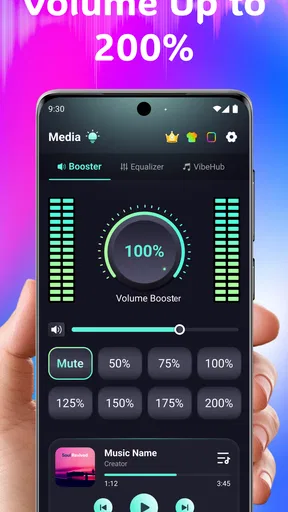
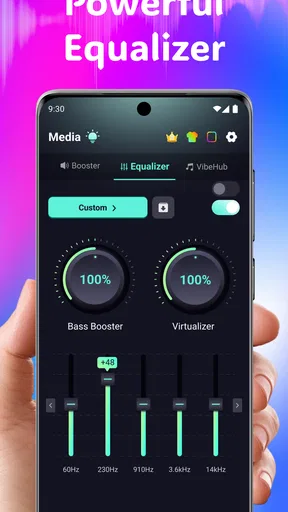
What really sets this app apart is its range of customization options. You can adjust the volume beyond the usual limits, which is perfect for those tracks that just need a little more oomph. And the bass booster? It's a game-changer. I tested it with a variety of music genres, and the difference was noticeable. Whether you're into hip-hop or classical, the app allows you to tailor the sound to your liking.
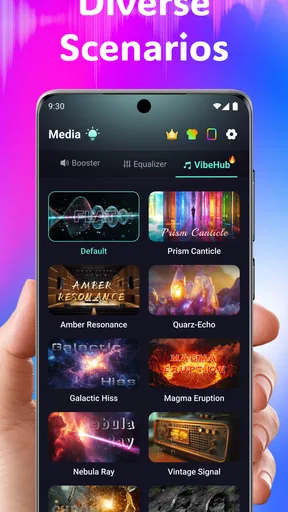
Then there’s the equalizer. With several presets like Rock, Pop, Jazz, and more, it’s easy to find a setting that enhances your listening experience. But if you’re feeling adventurous, you can create your own custom settings, tweaking the sliders until you hit that sweet spot.
Performance in Real Life
In terms of performance, this app doesn’t disappoint. I used it during my commute, at the gym, and even at home, and it consistently delivered high-quality sound. One thing I really liked was how it didn’t drain my battery as much as I expected. Some apps turn your phone into a power-hungry beast, but this one maintains a good balance between performance and efficiency.
Also, I didn’t encounter any significant lag or crashes, which is always a plus. It runs smoothly in the background, allowing you to multitask without any hiccups.
Getting more consistent results
A useful way to judge the controls is to test a short, familiar section of audio rather than switching between unrelated songs. I would keep the device’s volume steady, change only one equalizer or bass setting, and replay the same passage. That makes it easier to tell whether the adjustment actually improves the sound or simply makes it louder. For podcasts, a voice recording is a better test than a bass-heavy track; for music, choose something with both vocals and instruments.
When moving from one environment to another, I would revisit the level instead of assuming the previous setting still fits. A quiet room and a noisy commute call for different listening choices, but raising volume to compete with traffic or gym equipment is not always the safest answer. In those situations, headphones that provide better isolation may be a more sensible alternative than pushing the phone’s output harder.
Compared with the usual alternatives, this app’s advantage is that it brings volume boosting and sound shaping into one listening workflow. The phone’s own volume slider remains the simpler choice for quick changes, while the audio controls already built into a music player can be preferable if you only want to alter music inside that one player. A separate booster is most appealing when you want to experiment across listening situations; it is not automatically better for every source or every listener.
User Experience and Design
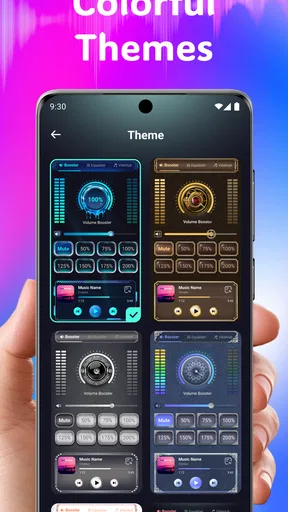
The app’s design is sleek and modern, with vibrant colors that are easy on the eyes. Navigating through the app is a pleasant experience, thanks to its user-friendly layout. The controls are well-placed, ensuring that adjusting the settings is just a tap away.
Moreover, the app offers a night mode, which is a thoughtful addition for those late-night jam sessions. It’s clear that the developers put a lot of thought into making the app not just functional, but also enjoyable to use.
Age, trust, and household use
The app is rated for Everyone, which makes its age context broad, but I would still guide younger listeners about comfortable volume rather than treating a booster as permission to turn things up without limits. That advice is especially relevant when headphones are involved. For a parent or caregiver, the practical approach is to discuss listening habits and check the level when sharing a device; I would not assume that an age rating means the app itself manages a child’s settings or listening time.
It is developed by Best Translate LLC and has an average rating of 4.5 from around 784 ratings, with 195 written reviews and over 100,000 installs. Those figures suggest that plenty of people have tried it, but they do not tell me whether it will suit a particular phone, audio source, or set of headphones. I would judge it by a careful trial with familiar content, keeping expectations realistic about what equalization can and cannot fix.
The app is free, with in-app purchases ranging from $6.99 to $69.99 per item. I would check the purchase details in the app before paying for anything and decide first whether the basic listening adjustments solve the problem. For a household with several listeners, that is a better starting point than buying on the assumption that everyone will want the same sound controls.
Final Thoughts
Overall, Volume Booster Bass Booster EQ is a solid choice for anyone looking to elevate their audio experience. Whether you’re an audiophile or just someone who likes their music loud and clear, this app has something for everyone. It’s not just about boosting volume; it’s about enhancing the overall quality of sound on your device.
So, if you’re ready to give your audio a boost, this app is definitely worth checking out. It’s easy to use, packed with features, and most importantly, delivers on its promise of superior sound quality. Why settle for average when your phone can sound extraordinary?
Ready to transform your listening experience? You can find the download links for Android and iOS on our website. Trust me, your ears will thank you.
Verdict
Strengths of Volume Booster Bass Booster EQ
- Enhances audio clarity and depth.
- Customizable equalizer settings.
- User-friendly interface.
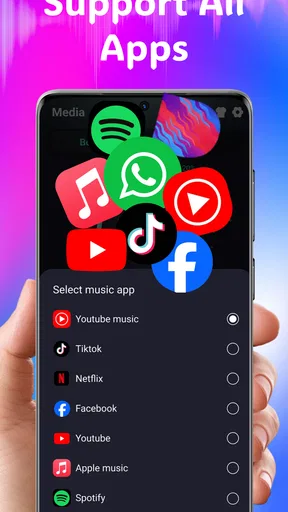
- Works with multiple apps seamlessly.
- Boosts bass without distortion.
Limitations of Volume Booster Bass Booster EQ
- May drain battery quickly.
- Occasional ads can be intrusive.
- Limited features in free version.
- Can cause speaker damage if overused.
- Some compatibility issues with older devices.
Similar Picks in This Category
View All
WebMD: Symptom Checker
WebMD, LLC4.1

Microphone Amplifier
DOSA Apps4.2

Anatomy Learning - 3D Anatomy
3D Medical OU4.5

Period Tracker and Calendar
SimpleInnovation4.9

GoodRx: Prescription Coupons
GoodRx4.8

CVS Health
CVS Pharmacy4.5
Frequently Asked Questions
What features does Volume Booster Bass Booster EQ offer?
Volume Booster Bass Booster EQ provides a range of features including an advanced equalizer, bass enhancement, and volume amplification. Users can customize sound settings to suit different audio types like music, podcasts, or movies. The app also includes pre-set sound profiles and a visual sound spectrum for an immersive audio experience.
Is Volume Booster Bass Booster EQ safe for my device?
Yes, Volume Booster Bass Booster EQ is designed to be safe for your device. However, it is important to use the volume enhancement features responsibly to avoid potential damage to your device's speakers or hearing. Always start with lower volume settings and increase gradually to ensure safety.
Does the app work on both Android and iOS devices?
Volume Booster Bass Booster EQ is available for both Android and iOS platforms. It offers a seamless user experience across different devices, ensuring that users can enjoy enhanced audio quality regardless of their smartphone's operating system. Check the app store for compatibility with your device model.
Can I use Volume Booster Bass Booster EQ with other apps?
Yes, Volume Booster Bass Booster EQ can be used alongside other audio-playing apps. It enhances the sound output from music players, video streaming services, and even phone calls. This versatility makes it a valuable tool for any audio enthusiast looking to improve their listening experience.
Does the app require an internet connection to function?
No, Volume Booster Bass Booster EQ does not require an internet connection to boost your audio. Once installed, the app works offline, allowing you to enhance sound quality at any time, whether you're commuting, at home, or in a remote area without internet access.
